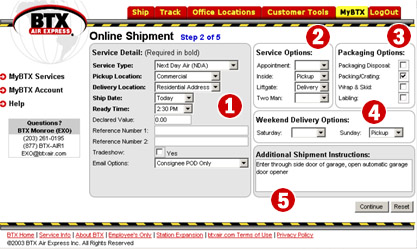
Service Detail –
Each of the fields in this section contain either drop-down boxes with
a list of options from which to choose, a place to enter text, or a checkbox to
select:
Service Type – Select from the following Service Types:
-
Next Flight Out NFO – Shipment sent out on the next available flight
-
Same Day Air SAM – Shipment reaches destination on the same day it is
shipped.
-
Next Day Air NDA – Shipment arrives on the next business day from when
it was shipped
-
2nd Day Air 2ND – Shipment arrives on the second business day from when
it was shipped
-
3rd Day Air 3RD – Shipment arrives on the third business day from when
it was shipped
-
Economy (3-5 Day) ECO – Shipment arrives 3 to 5 business days from when
it was shipped
-
Less Than Truckload LTL – Your shipment is sent as a less- than-truckload
shipment. When you select this service level, you will see two additional
fields appear:
-
Full Truck Load FTL– Your shipment occupies a full truck load.
There is no guaranteed delivery date. When you select this service, you
will see three additional fields appear:
-
Loading Time (FTL ONLY) – Select the
estimated load time and
unload time of your shipment from 1 to 8
hours, using the drop-down boxes provided
-
Driver Assistance (FTL ONLY)– Using the
drop-down, indicate if Driver Assistance will be required with the Pickup, the
Delivery, Both or None
-
Expedited Trucking (Hot Shot) HOT – Your shipment is placed on a truck
which is then driven directly to the shipment's destination
Pickup Location – Select from the following pickup location types:
Delivery Location – Same options as Pickup Location; select the option which
best applies
Ship Date – Select a ship date from a range of "Today" through 10 days out into
the future
Ready Time – From the drop-down box, select the time the shipment will be ready
for pickup
Declared Value – Please enter the declared value of the shipment
Reference number 1 & 2 - You may enter one or two internal reference numbers.
Once the shipment has been fully entered into the system, you will have the
option of tracking by those reference numbers, as well as our BTX Air Waybill
number.
Tradeshow – Check the box if the shipment is for a trade show or convention.
Email Options – From the drop-down box, you can select a variety of options
which triggers email notifications various levels, to various people involved
with the shipment:
-
No Status Email – No shipment or delivery status emailed
-
Shipper POD Only – Shipper receives Proof Of Delivery (POD) via email
-
Shipper Status & POD – Shipper receives all changes in shipment status via
email, e.g., status change from "to be picked up" to "picked up" to "In transit"
to "Out for delivery" to "Delivered" etc., and
receives Proof Of Delivery (POD) via email
-
Consignee POD Only – Consignee
receives Proof Of Delivery (POD) via email
-
Consignee Status & POD – Consignee
receives all changes in shipment status via email, e.g., status change from "to
be picked up" to "picked up" to "In transit" to "Out for delivery" to
"Delivered" etc., and receives Proof Of Delivery (POD) via email
-
Shipper & Consignee POD – Shipper and
Consignee receive Proof Of Delivery (POD) via email
-
Shipper Status Consignee POD –
Shipper receives all changes in shipment status via email; Consignee receives Proof Of Delivery (POD) via email
-
Consignee Status Shipper POD –
Consignee receives all changes in shipment status via email;
Shipper receives Proof Of Delivery (POD) via email
-
Shipper Consignee ALL Status –
Shipper and Consignee receive all changes in shipment status via email, e.g.,
status change from "to be picked up" to "picked up" to "In transit" to "Out for
delivery" to "Delivered" etc., and receive Proof Of Delivery (POD) via email