MyBTX Sign Up And Log In
MyBTX is accessed from the
btxair.com home page.
When you arrive at the btxair.com home page, you are presented
with several navigation choices. Several of them are related to
MyBTX:
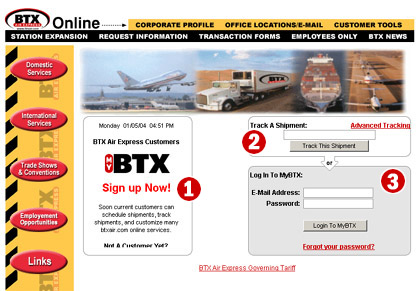
-
MyBTX Sign Up Link – This option allows you
to easily register Your Company. In order to
complete the registration, you must be a current BTX Shipping customer.
You will be asked for your BTX Air Express Customer Number and your Postal Code.
Once you enter that, MyBTX knows who you are and
auto-populates many default information fields. If you are not a current BTX Air
Express shipping customer, there is a link where you can securely submit your
information to become one!
Shipment Tracking and Advanced Tracking – Even if you are not registered
with MyBTX, this feature allows you to track a
shipment. All you need is a BTX Air Express air waybill number. Enter the number
and click the "Track This Shipment" button and your tracking results will be
displayed. Advanced tracking features such as multiple shipment tracking
and tracking by your reference number are also available. If you are registered
with MyBTX, your freight charges will also be
displayed with your tracking results.
Log In To MyBTX – If you have already
registered with MyBTX, this is where you Log In.
When you registered, you selected a password which, when combined
with the email address you registered under, comprises your Log In Information.
Later in this tutorial you will see how you can change your password if you
like.
|
|





