MyBTX Shipping Manager
Using the MyBTX
Shipping Manager, you can create shipments and shipment templates, finish
uncompleted shipments and print labels and air waybills
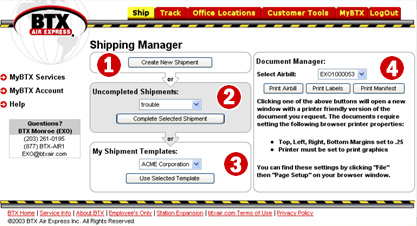
-
Create New Shipment
–
Creates new online shipments
-
Uncompleted Shipments –
Displays a list of uncompleted shipments. Choose one from the
drop-down box and click on "Complete Selected Shipment" to complete your
unfinished shipment. **Note** Do not confuse
"Uncompleted Shipments" with "Undelivered Shipments"; "Uncompleted Shipments"
means online shipments which you started to fill out, but have yet to finish
filling out and submit. "Completed Shipments" means shipments you have
completely filled out and submitted to BTX Air Express.
-
My Shipment Templates – When you create a new
shipment, you can save the shipping data as a template for re-use. This is
a real timesaver for users who ship frequently to the same customer -
Document Manager – From the drop-down, select any
air waybill from the list of completed shipments
-
Preview and print BTX Air Express Air Waybill to your laser, inkjet or impact
printer
-
Preview and
Print Shipping Labels in the format you selected (Plain Pouchable
or Avery 4X6) to your laser or inkjet printer (coming soon - support for thermal
label printers)
-
Preview and
Print Shipping Manifest to your laser, inkjet or impact printer
|
|





