MyBTX Account Creation
The first person from each company who registers with
MyBTX is designated the
Administrator for that company
Each subsequent registrant from your company will see an alert
stating that their registration has been forwarded to (email address of company
admin) for approval.
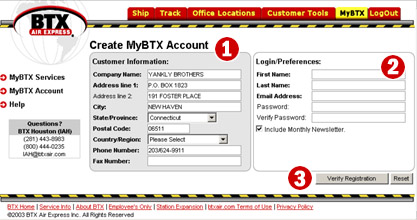
-
Customer Information
–
The Customer Information fields are populated
automatically with data retrieved from our customer database These data can be
updated.
-
Login Preferences – Enter your first name, last
name, email address and password. Passwords must be at least 7 characters in
length, contain at least one upper case character (CAP), one numeral and may not
contain your first or last name.
-
Verify Registration – Once you have completed the above two steps,
click on the "Verify Registration" button to submit and verify your
registration.
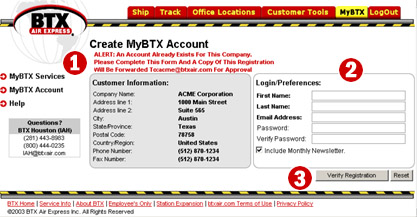
You will see the screen below if your company already has at least one
MyBTX account registered. The main difference
is that you cannot edit the pre-populated Customer Information, and your
registration has to be approved by the designated administrator at your company:
 |
|





